

Having trouble because your Brother printer is not printing? This can happen because of a connection problem, stuck print jobs, an incorrect printer selection, or an issue with the Windows Print Spooler.
In this guide, we’ll cover the simple troubleshooting steps shown in our Print Smart Help video so you can get your Brother printer working again.
Watch the Video
Follow along with our step-by-step video for an easy visual guide to fixing a Brother printer that isn’t printing.
For more printer setup guides, troubleshooting tips, and easy fixes, follow Print Smart Help.
Check Your Brother Printer Connection
Before changing any Windows settings, make sure the printer itself is ready.
First, turn on your Brother printer and check its display for any error messages. Look for issues such as a paper jam, no paper, or another printer warning.
If you’re using a USB connection, make sure the cable is firmly connected to both the printer and computer.
For a Wi-Fi Brother printer, make sure the printer and computer are connected to the same network.
Make Sure the Correct Printer Is Selected
Windows may sometimes have multiple printer entries installed.
Open:
Start → Settings → Bluetooth & devices → Printers & scanners
Find your Brother printer and select it.
Make sure you are using the correct printer. If Windows provides the option, you can also set the Brother printer as your default printer.
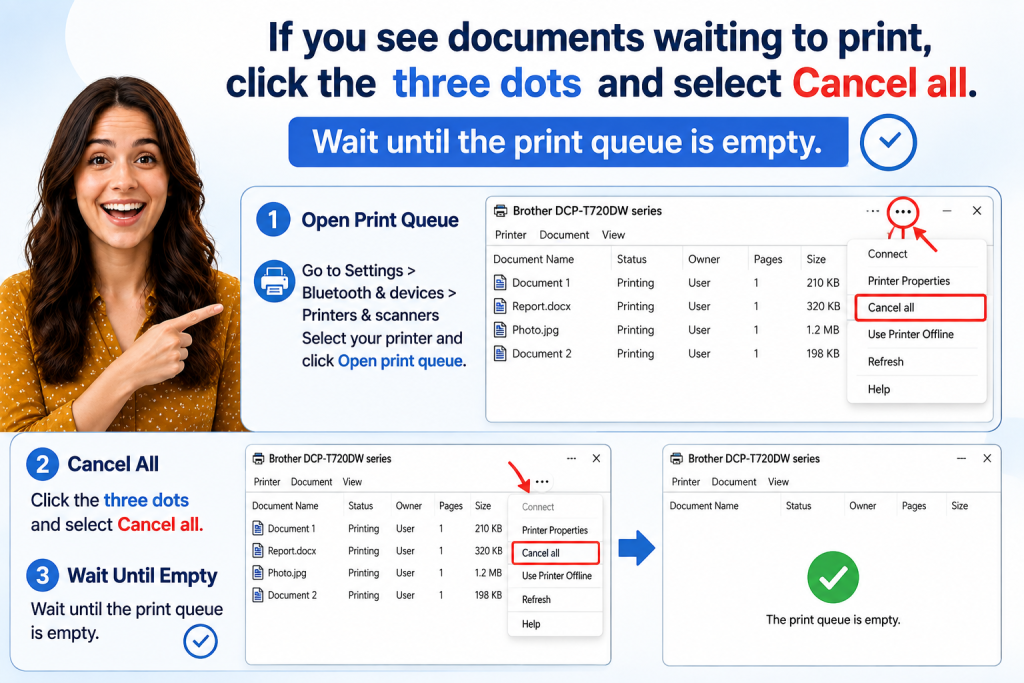
Clear the Brother Printer Print Queue
A stuck document can prevent newer documents from printing.
Go to:
Settings → Bluetooth & devices → Printers & scanners
Select your Brother printer and click Open print queue.
If documents are waiting, click the three-dot menu and select Cancel all.
Wait until the print queue becomes empty.
Once the queue is clear, try sending a new document to the printer.
Restart the Printer and Computer
If the printer still doesn’t respond, restart both devices.
Turn off the Brother printer and restart your Windows computer. After Windows starts, turn the printer back on and allow a few moments for the connection to be restored.
Then try printing again.
Restart the Windows Print Spooler
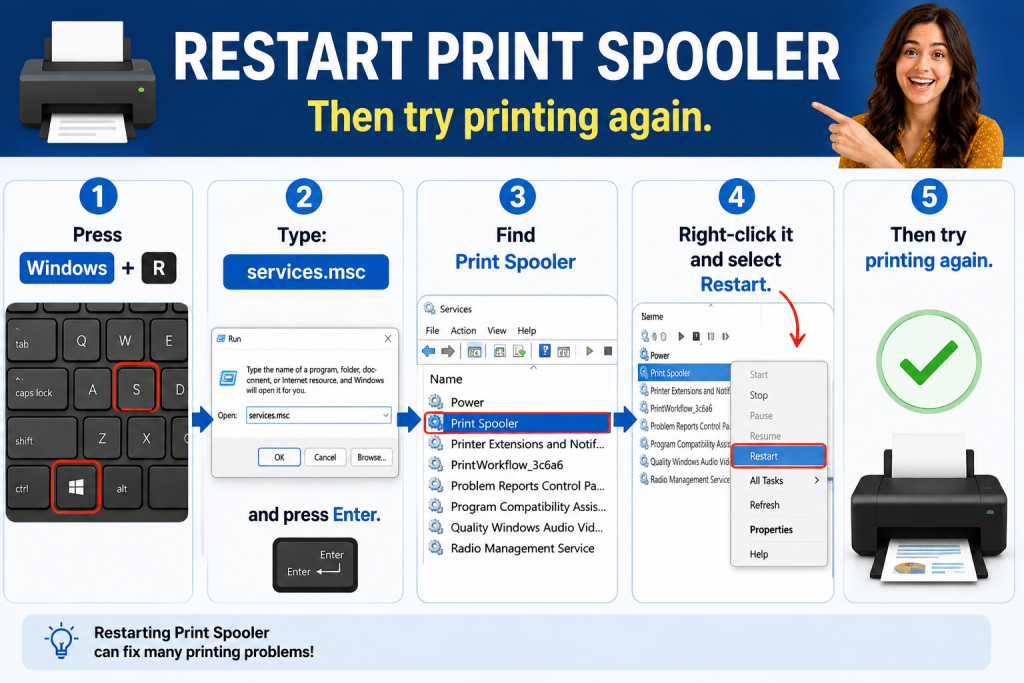
If print jobs remain stuck or Windows isn’t processing your print command, restarting the Print Spooler can help.
Press:
Windows + R
Type:
services.msc
and press Enter.
In the Services window, find Print Spooler.
Right-click it and select Restart.
After the service restarts, try printing your document again.
What If Your Brother Printer Still Won’t Print?
If these steps don’t solve the problem, check the exact Brother printer model and look for additional connection, driver, or printer-status issues specific to that model.
You can also leave your Brother printer model number and the exact problem in the comments on our video. The Print Smart Help community can help you troubleshoot the issue.
Frequently Asked Questions
Why is my Brother printer connected but not printing?
A stuck print queue, incorrect printer selection, connection problem, or Windows Print Spooler issue can prevent printing.
How do I clear a Brother printer queue in Windows 11?
Go to Settings → Bluetooth & devices → Printers & scanners → your Brother printer → Open print queue, then select Cancel all.
How do I restart Print Spooler?
Press Windows + R, type services.msc, press Enter, find Print Spooler, right-click it, and choose Restart.
Should I restart my Brother printer?
Yes. Restarting the printer and computer can help refresh the connection and clear temporary printing problems.
Still need help with your Brother printer?
Comment your printer model number and issue below the video, and we’ll do our best to help.